
WERCSmart Subscription Payment Methods
WERCSmart supports three payment methods for subscriptions:
You must select one default payment method. This is the method used for all charges unless you update it in your account settings. Multiple payment methods can be stored, but only one can be marked as default.
Credit Card
- Fastest option: payments are processed within 1–2 hours after invoice generation.
- Commonly used for immediate transactions.
- If your payment is declined, contact your bank or card issuer.
Note: Starting April 2026, UL Solutions will pass through applicable credit card processing fees based on state regulations. To avoid these fees, consider switching to ACH.
Automated Clearing House (ACH)
ACH is a secure electronic transfer between bank accounts. It’s cost-effective and ideal for renewals or recurring payments.
- Processing time is typically 1 business day, up to 3 business days in some cases.
- Benefits of ACH include lower transaction fees compared to credit cards with predictable, secure transfers.
- Include your WERCSmart company name and invoice number in payment notes to avoid delays.
How to Set Up ACH in WERCSmart
- Log in as an Account Administrator.
- Navigate to My Account > Payment Methods.
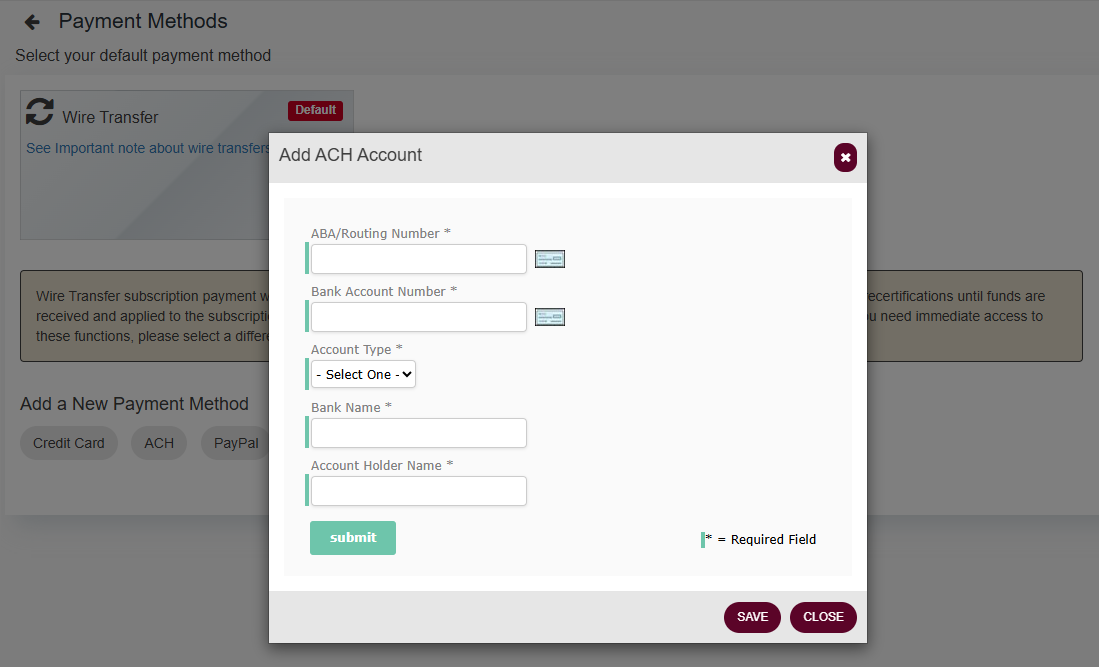
- Click Add New Payment Method and select ACH.
- Enter:
- Bank Routing Number
- Account Number
- Account Type
- Bank Name
- Account Holder Name
- Click Submit to save.
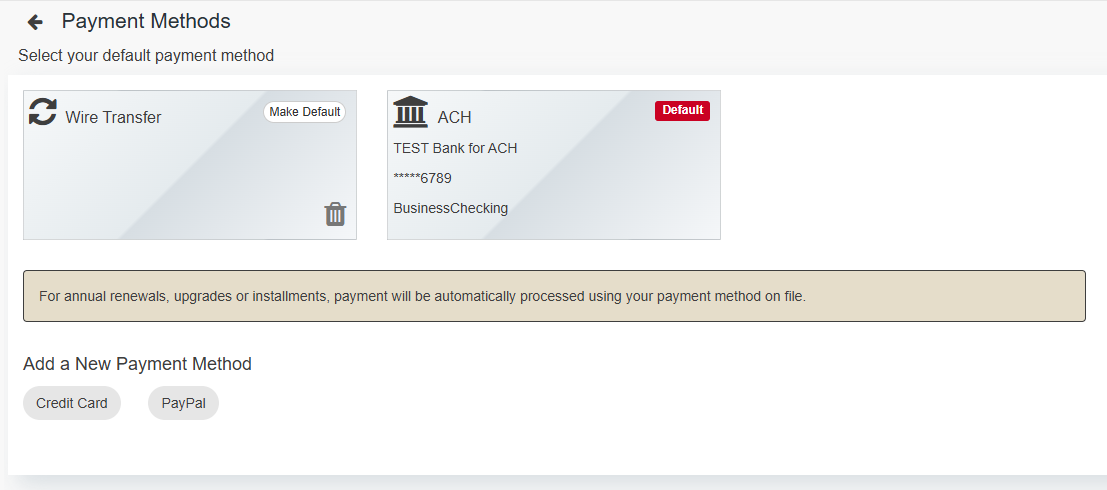
- Once validated, set ACH as your default by selecting Make Default.
Wire Transfer
- Available for domestic and international payments.
- Processing time:
- 1–3 business days (US)
- Up to 15 business days (International)
- Include your WERCSmart company name and invoice number on the transfer document.
- After initiating the transfer, email nbk.strcashapplication@ul.com with details for a timely application.
- Your account remains locked until funds are received.
- Bank details are included on your invoice. Use the UL WERCSmart payment profile and W-9 attached to this article.
Attachments
Hover over each attachment name to view and download.
- UL WERCSmart W-9
- Banking Profile
- Tax and Payment Information
For answers to your UL Solutions billing and invoicing questions, please see UL Solutions Invoicing and Billing FAQ.